



Do you want free and, most importantly, functional scripts and hacks for Bee Swarm Simulator? Then you've come to the right place, as we've gathered the best and most versatile scripts with features like Auto Farm, Auto Sprinkler, Auto Dig, Walk Speed, Jump Power, Auto Kill, and many other capabilities for Bee Swarm Simulator that can be enabled via a GUI.
Running scripts in Bee Swarm Simulator makes the grind way easier and way faster, letting you automate a ton of stuff while everyone else is still sweating it out. Best part? You can tweak the script settings to match your own playstyle, whether you wanna go full AFK or stay hands-on.
How to Download Bee Swarm Simulator Scripts
You don’t actually need to download Bee Swarm Simulator scripts themselves — that’s the easy part. What you do need is a Roblox executor/injector, since that’s what lets you run scripts in-game.
There are tons of executors out there — free or paid, PC or mobile — and while they all look a bit different, they pretty much work the same way under the hood. Pick one that fits your setup and you’re good to go.
Here are some of the most popular injectors among Roblox players that you can download:
EXECUTOR | SUPPORTED PLATFORM | DRAWBACKS | LINK |
Delta Executor | Android, iOS | Requires manual updates after Roblox patches | https://delta-executor.com/ |
Xeno Executor | Windows PC | No versions for Android and iOS | https://xeno-executor.com |
KRNL Executor | Android and iOS | Does not support Windows PC | https://krnlexecutor.com/ |
Arceus X Neo | Android and iOS | Limited PC support | https://arceusx.com/ |
If you play Bee Swarm Simulator on PC, we recommend using Xeno Executor — it's a free, safe, simple, and easy-to-use program, but it only works on PC. Additionally, below we will explain how to run scripts in Bee Swarm Simulator using this program.
For Roblox players who prefer to play on mobile devices, we recommend Delta Executor. For more details about the program and how to use it, read a separate article.

All Bee Swarm Simulator Scripts
We have compiled a list of all known and working Bee Swarm Simulator scripts for you. Just click the + icon next to the script, copy the Lua script code for further use.
NOTE: The list includes both free working scripts and scripts that require a key. Each script developer has individual methods for obtaining a key for activation.

List of Bee Swarm Simulator Scripts
How to Use Bee Swarm Simulator Scripts
Don't know how to use scripts? Let us help you. If you haven't used Roblox executors and script injectors before, we recommend following the steps as described below in this guide for Bee Swarm Simulator scripts.
Step 1
First things first — you’ll need a Roblox executor/injector. For this guide, we’re rolling with Xeno Executor.
Head over to the official site by typing xeno-executor.com/download/ straight into your browser. Once you’re on the page, smash the blue Download Now button and let it do its thing.


Step 2
After the download finishes, extract the files somewhere easy to find on your PC, then just run Xeno.exe to launch the executor.

Step 3
Once Xeno Executor is up and running, launch Roblox and hop straight into Bee Swarm Simulator. With both the game and Xeno open at the same time, alt-tab back to Xeno and hit the Attach button to link it with Roblox.
If everything connects properly, you’ll see a message pop up in the bottom-right corner saying “Attached Ingame!” — that’s your green light to continue.

Step 4
Now copy and paste the script you need into the text field of Xeno Executor and click the Execute button to run the script in Bee Swarm Simulator.


Step 5
Give the script a few seconds to load up. If everything’s working as intended, an in-game menu should pop up where you can tweak settings, toggle features, and mess with whatever the script offers.
If the script is key-locked, you’ll need to grab the key first and punch it in before you get access to the full kit. No key = limited features (or no features at all).

General Instructions for Using Bee Swarm Simulator Scripts
STEP | ACTION |
Download Roblox Executor / Injector | Download a convenient script program: Delta, Xeno Synapse X, KRNL, or Fluxus, etc. |
Unpack / Install / Configure | If the program is archived — unpack it. If it's an executable file — install it. Then run the program and activate it if it requires a key. |
Launch the game / Join the server | Enter Bee Swarm Simulator. |
Paste the script into Executor / Injector | Paste the Bee Swarm Simulator script from our list into the open Executor. |
Run the script | Hit the button that executes it (usually labeled Execute) and let it do its thing. |
What to Do if the Bee Swarm Simulator Script Doesn't Work?
If you pop the script and instantly get kicked, slapped with random errors, the game hard-freezes, or literally nothing happens — yeah, that’s a big sign the script is cooked. Either it’s outdated, your executor can’t handle it, or the server’s anti-script system straight up caught it.
When that happens, just hop into a fresh Bee Swarm Simulator server and try a different script. Don’t forget: if you fully close Roblox, you’ll need to redo the whole setup from scratch.


Key Features of Bee Swarm Simulator Scripts
The functionality of scripts for Bee Swarm Simulator depends directly on what the developer has included. Some have many features, others somewhat fewer, but nonetheless, they remain useful for your beekeeping in Roblox.
For example, the Atlas script for Bee Swarm Simulator is completely free and has a large number of useful features divided into categories. Additionally, the script has very flexible settings that allow you to set parameters for each automatic action in Bee Swarm Simulator that you want. Let's look at a few of them:
FEATURE | DESCRIPTION / WHAT IT DOES |
Auto Farm | The character will automatically run from the hive to the flower field until the pollen bag is full / pollen is deposited in the hive. |
Auto Dig | The character will automatically collect pollen, so you won't have to hold down the mouse button and do it manually. |
Auto Quest | Automatic acceptance and completion of selected quests in the script settings if they are available to you. |
Auto Kill | You won't have to fight enemies, as the script will do it for you. |
Auto Plant / Auto Harvest | Automatic planting and harvesting of plants in the selected field |
 Farming category of the Bee Swarm Simulator script
 Combat category of the Bee Swarm Simulator script
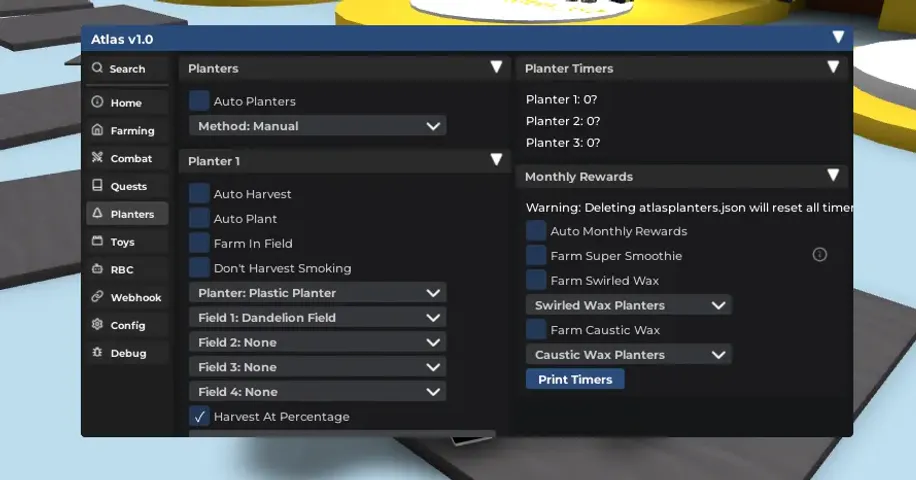 Planting category of the Bee Swarm Simulator script




Comments1