

If you’re into adorable, cozy games, Play Together will steal your heart right away! It’s a cartoony simulation game that lets you hang out with friends or meet new acquaintances. You can design your home, join fun mini-games with friends, and enjoy various hobbies. To add to the fun, you can redeem codes provided by the developers to earn useful rewards for free!
Play Together codes (or "coupons," as they’re called in-game) often grant items like card packs, pet eggs, and coins to give you an edge on Kaia Island. Go ahead and use our list of active and new Play Together codes to claim those freebies!
Play Together Codes (June 2025)
As of June 21, there are only 2 active coupon codes available to redeem:
- MINIMEMOB – 200 Teddy Coin, 1 Premium Card Pack (Expires after July 4)
- STMMINIME – 200 Teddy Coin, 1 Premium Card Pack (Steam Only) (Expires after July 4)
Coupon codes come and go quickly, so you’ll need to jump into the game fast to redeem them before they expire. While developers release codes at their own pace, each one comes with a set expiration date - typically lasting no longer than two weeks, or somewhere around that timeframe.
Expired Codes
- VOYAGEMOB
- STMVOYAGE
- SNAPLIFE4CUT
- DRAGONVILLAGEMOB
- STMDRAGONVILLAGE
- NIGHTMAREMOB
- STMNIGHTMARE
- 2025PT4HBD
- PT4HBD2025
- DREAMLANDMOB
- STMDREAMLAND
- PTPRE4HBD
- STEAMGRANDOPEN
- STEAMTOGETHER
- 2025SWEETGIFT
- LunarNewYear
- NICETOMEETSTEAM
- SHALLWESTEAM
- STEAMEMOJI
- PTINTHESTEAM
- MRYXMASPT
- PTYOUTUBE30K
- PTTIKTOK300K
- THANKFUL
- ZOMBIEHUG
- SHOWYOURMOVE
- CHUSEOKMOON
- SCHOOLREADY
- SUMMERCOOL
- PTGREENEARTH
- PTURO2024
- HAPPY5MAY
- 3YEARSTOGETHER
- HELLOSPRING
- DRAGONYEAR
- 2024NEWYEAR
- MRYXMASHNY
- THANKSFOR
- STEWPEPIE

How to Redeem Codes in Play Together
The code redemption feature in Play Together can be a bit tricky to find, as the home screen is filled with various buttons. If you're having trouble locating it, just follow these steps:
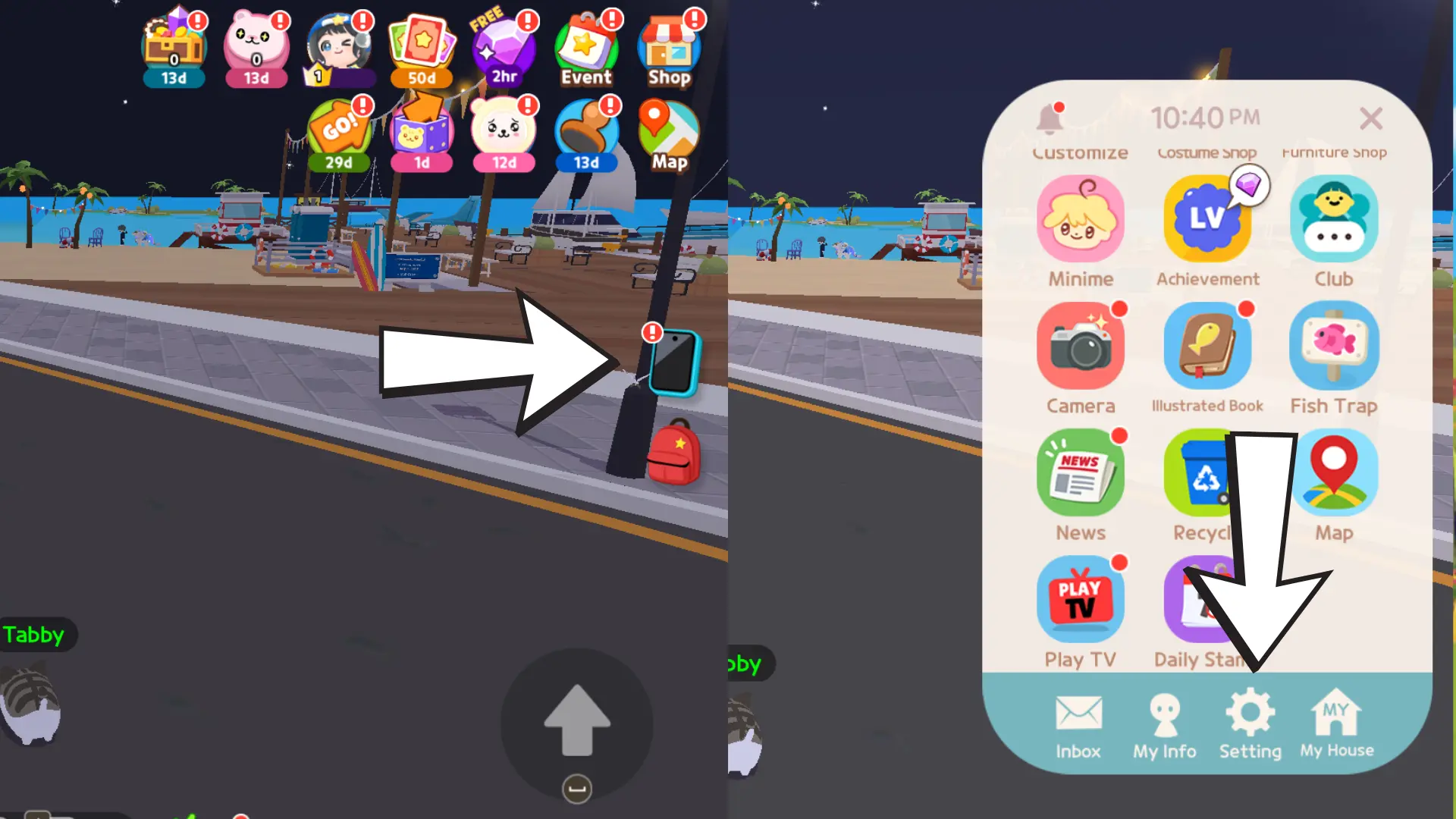
- Launch Play Together on either mobile or PC.
- Tap the Phone icon located on the right side of your screen.
- In the pop-up menu, go to Settings (gear icon) at the bottom navigation bar.
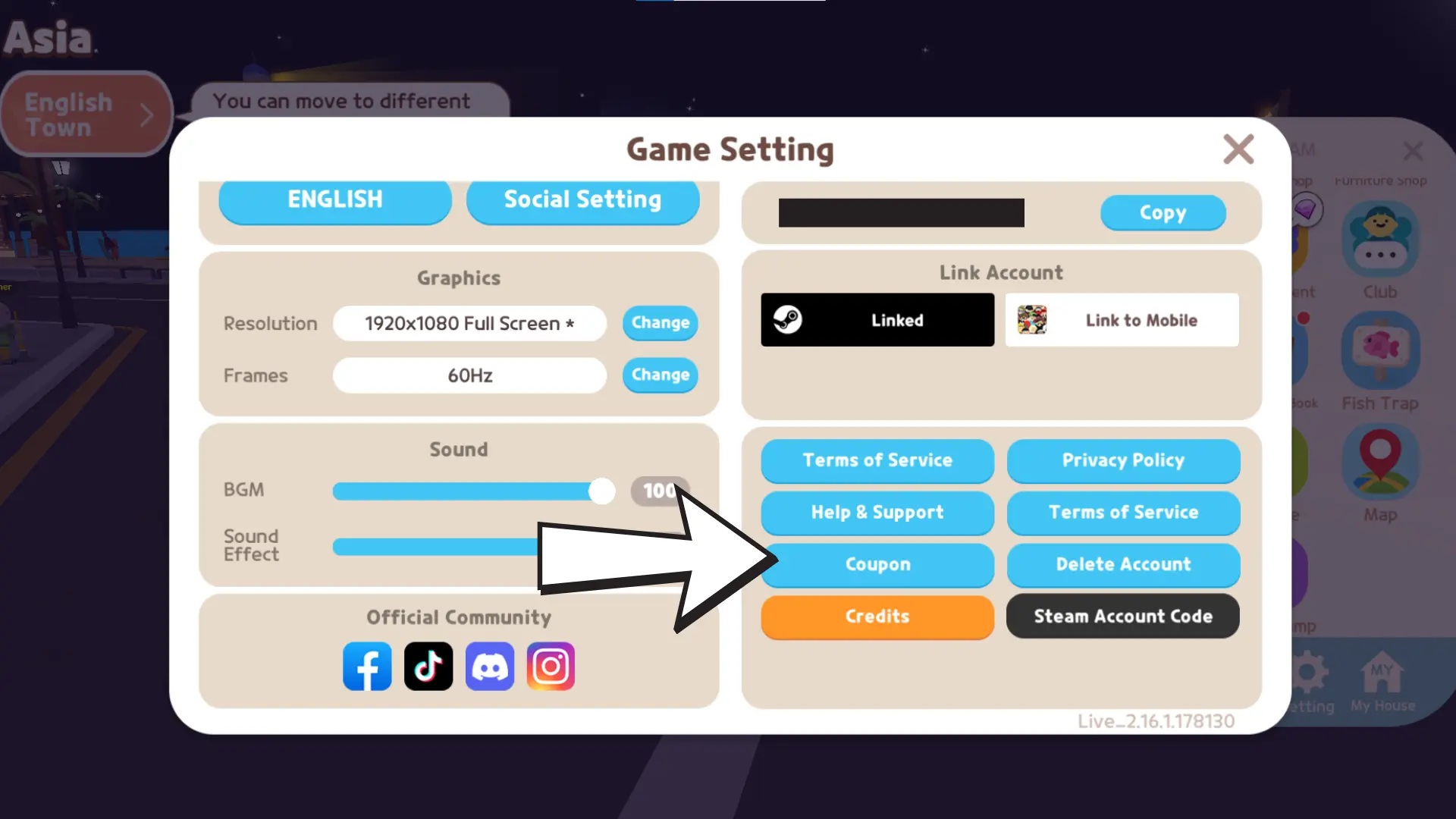
- In the new pop-out, find the "Coupon" button—it's located just above the orange Credits button.
- Tap the Coupon button and enter each active code individually.
- Press Redeem to instantly claim your rewards!
Where to Find More Play Together Codes
Play Together is active across all major social media platforms, making it easy for players to stay updated - no matter their preferred channel. If you're playing on PC, keep an eye on the latest news and updates via Steam. For other platforms, you can follow them on YouTube, Twitter, Facebook, and Instagram.
For a more community-driven experience, we highly recommend joining the game's official Discord server. There, you can connect with fellow Play Together players, ask for tips, share feedback, and receive direct updates from the developers, including the latest code releases!


Comments1